

Twitch, YouTube and Kick chat in one panel
Read Twitch, YouTube and Kick chat in one window with strAImer for Windows. Reply to selected connected chats and keep donations, events and viewer counts beside the conversation. Arrange the tiles to suit your stream.
Free — like everything that runs on your own PC.
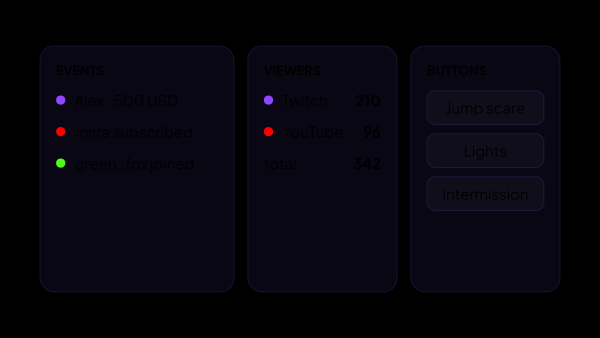
Why a panel at all
Settings pages are for before the stream. During it you have one hand free and about two seconds of attention, and that is a different interface.
- Tiles are laid out the way you want, and several named pages can be kept side by side.
- A page stays loaded when you switch away from it, so the chat feed does not start from empty every time.
- Modules bring their own tiles: install the auction and its tiles appear under Add module.
The events feed
One column with everything that happened, in the order it happened — so a donation missed mid-fight is still there when you look up.
- Donations, subscriptions and rewards land in one column whatever platform they came from. Bits, raids and clips are there too — those only Twitch reports.
- Filters by event type and by platform, when the feed gets too busy to scan.
- Subscriptions are split into the cases platforms confusingly call by one word: a free follow, a paid subscription with its tier, a renewal with the month count, and a gift with the giver’s name. A mass giveaway gets a row of its own.
- Gifted subscriptions have a switch of their own: a big giveaway stops burying the feed, and ordinary subscriptions stay in it.
- The tile keeps the last two hundred events it shows and, on a separate count, up to two hundred your filter hides, so a wave of follows never pushes donations out. Tick a type back on and what arrived while it was off is there.
- Newest on top or at the bottom, timestamps and donation texts shown or hidden, new rows blinking for as long as you like — set on the tile, not once for all of them.
The chat tile
Read Twitch, YouTube and Kick messages in one column. For example, select Twitch and YouTube to send one reply to both connected chats. Emotes, platform logos and viewer badges are switches, and the reply box can be hidden on a tile you only read.
- Tick the platforms your reply should go to. Tick nothing and it goes to every connected chat — which is not the same as ticking all of them, because a platform you add later is included too.
- The choice is remembered per tile, so one tile can answer on Twitch and another on YouTube.
- Write as yourself or as your bot — the second account you connect on the Bots page. The bot option greys out while no bot is connected on the platforms you are writing to.
- Moderation without leaving the panel: delete a message, time a viewer out for one, five, ten, thirty or sixty minutes — the length is picked on the tile — or ban. The ban asks once before it goes through, and an undo appears next to what worked where the platform allows one: on YouTube a timeout cannot be lifted at all, and a ban not always.
- Your own messages carry no moderation buttons, and neither do Kick’s: there are no moderation rights on Kick yet.
- Scrolling up to read something older does not get yanked back down by every new message.
The viewer counter
A small tile that answers the question you glance at most often.
- A row per platform — Twitch, YouTube, Kick — plus the total.
- “Offline” and zero mean different things and are shown differently: the first is the platform saying there is no stream, the second is us not having heard from it at all.
- Platforms you do not use are switched off in the tile’s own settings, and several tiles can exist with different sets.
- YouTube follows its live chat, Twitch and Kick are asked about every half a minute — nothing here needs refreshing by hand.
A website inside a tile
Part of what you watch mid-stream is not ours and never will be: the Twitch Stream Manager, YouTube Studio, a donation dashboard, a Companion page on your own network. The Web page tile puts one of them straight onto the panel, the way a browser dock does in OBS.
- Five dashboards are one press away: Twitch Stream Manager, YouTube Studio, StreamElements, Streamlabs and DonationAlerts. Anything else goes in by typing its address.
- You sign in inside the tile, once. The sign-in survives a restart and is shared by every tile of this kind, so a second tile on the same site opens already signed in.
- The tile has a scale of its own, 60 to 250%: a dashboard built for a full screen stays readable in a corner of one. Two buttons in its header reload the page or hand it to your browser.
- Links to other sites open in your browser instead of taking over the tile, so a link someone posted in chat does not cost you the dashboard for the rest of the stream.
- A public site in a tile does not get at OBS, a Companion panel, a camera or the router the way a page in an ordinary browser would: requests like those are turned away. A tile you pointed at a local address yourself still reaches them, which is exactly what makes a Companion panel worth putting there. It is not full protection against a hostile site, so put in only the sites you trust.
- Nothing has to be installed for it and nothing has to be paid: the entry is at the top of the add list from the first launch.
What the panel is not
The panel is a screen for you, not for the people watching — and that settles most of what it does not do.
- Not a hardware deck and not a phone app: it is a section of strAImer on the computer you stream from.
- Not an overlay. Nothing on the panel is drawn into OBS or onto the stream — overlays are a separate thing and live in their own sections. What reaches viewers from here is only what you send yourself: a reply, a timeout, a ban.
- Not a bot. The panel answers nobody on its own: every message and every ban here is one you pressed.
What else can live there
The tiles below belong to other sections and appear once those modules are installed.
- Auction: the desk, the lots, the disputed bids, the wheel and the bracket.
- Scenarios: what is running now, and your own named buttons.
- Voice over: the current line, the queue, skip and stop.
What it is made of
Each part is a separate module: you install only the ones you need, and any of them can be removed without breaking the rest.
Getting started
- Open Dashboard in the sidebar, press Edit and then Add module.
- Arrange the tiles, double-click a header to rename one, and create a second page if one screen is not enough.
- Set each tile up through the gear in its header — settings are per tile, not global.
- Install the modules whose tiles you are missing.
Before a platform is connected the tiles fill with sample rows marked demo, so the screen can be laid out before your first stream.
Works together with
Get strAImer
Everything on this page runs on your own computer — free, no account, nothing to connect.
Missing something here? Ask for it on the ideas board — votes show what people need most. Propose an idea