

One page with every link you give out
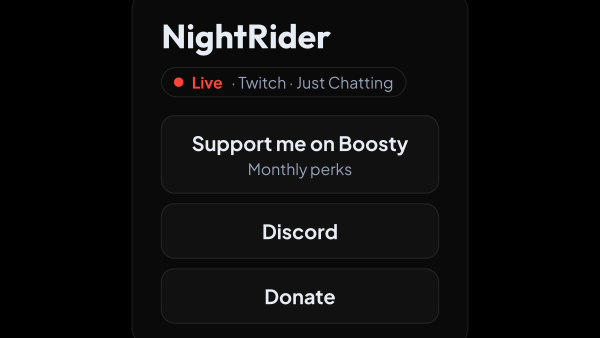
A public card at straimer.com/s/your-name: donation links, card number, PC specs, schedule. Built inside the app, shared as a single link — in your channel description, your Twitch panels, your chat pin.
Free — like everything that runs on your own PC.
Ten kinds of block, and that is the whole list
Blocks go on any tab in any order. Each one is something your chat already asks you about.
- Link button — a donation, a platform, your shop: a label, the address and a line of explanation under it.
- Donation form: the DonatePay or Ko-fi form right on the page. Visitors see a button first, and the service loads only for those who press it.
- Copyable value — card number, wallet, promo code, with a Copy button beside it.
- Social row — platform icons in a row, instead of ten buttons one under the other.
- Spec table — “My PC” as pairs: processor, graphics card, monitor.
- Schedule — by day of the week, the thing chat asks about more than anything else.
- Q&A — the questions you answer every stream, folded away until someone opens them.
- Text, heading and divider — to break a long tab into parts.
Tabs, not a wall of buttons
A visitor who wants to donate should not scroll past your keyboard model. Put each purpose on its own tab.
- Each tab has its own address — /s/your-name#donate — so you can link straight to it from a chat command.
- Fields go on any tab in any order: link buttons, copyable values, spec tables, schedule, Q&A.
- The card fits a phone screen, which is where most of your viewers will open it.
- Every block has its own switch: the donation link you only run over the holidays comes off the page and keeps its settings — and a switched-off copyable value is not in the page at all, not merely hidden.
It keeps itself up to date while you play
The live badge changes on its own while you stream; everything else here changes when you save the page.
- A live badge lights up under your name while you stream: the platform, the category, and, with Twitch, Kick or YouTube connected, a link straight to the broadcast.
- Live on two platforms at once and the badge names both. Where your viewers watch you is their choice, not ours.
- It goes out by itself a few minutes after the app stops reporting, so “live” cannot sit there all night.
- A separate switch lists you in the “Streaming with strAImer” block on our home page while you are live and for a day after. The block shows up once at least three streamers are in it. Both switches start off.
- Values you inserted from your own info — Chat Bot → Knowledge Base — sit in the page as a name, not a copy: change the Discord invite there, save the page, and every field that used it is new. One edit, not six.
A card number that scrapers do not collect
Copyable fields can be marked so the value never sits in the page itself — it loads when a visitor presses the button.
- Someone downloading thousands of pages with a script gets nothing.
- The page is closed to search engines, so your details never surface in results.
- What it does not do is hide anything from a person who opened your page — no page anywhere can, and we say so instead of promising otherwise.
It looks like the rest of your stream
Start with a theme; the sliders are there if you want them.
- Seven themes — Midnight, Paper, Sunset, Terminal, Candy, Deep, Grid — and everything after that is optional.
- Sixty-five settings in eight groups: background, card, text, tabs, link buttons, blocks, social row, footer.
- A look you saved from your alerts or your chat overlay applies to the page, and the page’s look applies back to them — one list of templates for all of it.
- The moving background comes apart into three layers — glow, grid and drifting particles — each with its own brightness and colour.
- The preview repaints while you drag the slider: nothing to reload to see what changed.
It stays up when your PC does not
The page lives on our servers, not on your machine. Turning the computer off does not take your links offline.
- Edited in the app, published in a click, changed as often as you like.
- Unpublished pages answer “not found”, so an address you are still working on gives nothing away.
- Copy, Show and the names of the days come out in English, and in Russian for a visitor whose browser asks for it. What you wrote stays exactly as you wrote it.
- Free, and there is no second account to make: it publishes through the strAImer account you already sign in to.
What it is made of
Each part is a separate module: you install only the ones you need, and any of them can be removed without breaking the rest.
Getting started
- Sign in to your strAImer account — Settings → strAImer Account.
- Open Streamer Page → Page menu: your name and the first tab are already filled in.
- Add your donation links, then whatever else your chat keeps asking for.
- Pick a theme in Streamer Page → Appearance, or leave the one that is set.
- Switch Published on and share the link.
Images and embedded video are not on the page yet — the nine blocks above are today’s whole list.
Works together with
Get strAImer
Everything on this page runs on your own computer and is free. It needs a strAImer account to work, because the page it publishes lives on our site.
Missing something here? Ask for it on the ideas board — votes show what people need most. Propose an idea