

A 3D mascot for OBS: Bytey
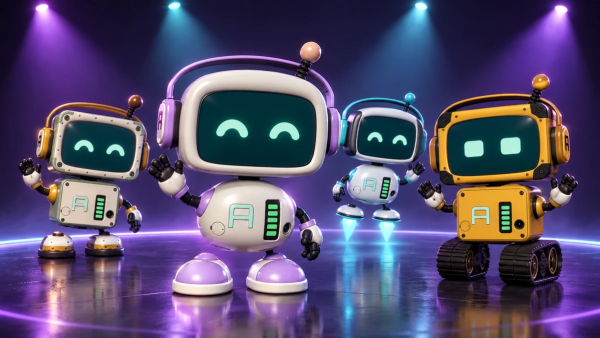
A 3D mascot for OBS. Dances to your alerts, thanks your viewers and recharges with their support.
Free, except the AI part — that one runs on our server and costs credits.
Waking Bytey up…
From your stream
Silent preview
What he does on your stream
Bytey works the moment he is in your scene: no setting has to be touched before he dances to your first alert.
- Dances to the sound of your alerts, and to clips and media playing in OBS.
- Thanks the viewer for a donation, bits, a subscription, a gifted sub, a follow, a raid or a channel point reward you pick, in a short line on his screen.
- Runs on a battery that drains over the stream and charges when someone donates.
- Gets bored when nothing happens: looks around, yawns, checks the time, waves.
- Takes a walk across a wide scene now and then, if you turn walking on.
- Shows the steps of your voice assistant and of your chat bot, if you use the AI Stream Agent.
He dances to the sound of your stream
Bytey has no music of his own. He listens to what already plays on your stream and finds its beat on your computer.
- Alert sounds from strAImer, for the kinds of alerts you pick: donations, bits, subscriptions, gifted subs, follows, raids and rewards.
- Browser sources in OBS, such as clips and media requests, when their Control audio via OBS box is unticked, as long as you have not ticked sources for him.
- OBS sources you tick for him in his editor, under What Bytey listens to, through the strAImer plugin for OBS: press Install plugin there and restart OBS. Then he hears only what you ticked.
- The style follows the music: Rock, Drum & bass, Disco, Flow or Robot dance, picked by the track or fixed by you, with 31 dance combinations.
- He moves harder in the loud parts and calmer in the quiet ones, and in OBS sources he stands still under speech with no music.
A thank-you for every event
His face is a screen, and the screen carries a short line for whatever just happened.
- Three ready lines for every situation, in the language the app is set to, plus your own lines one per line.
- The viewer's name, the amount, how much charge he gets and the number of raiders are filled in for you.
- A line too long for his screen scrolls across it.
- Font, weight, size, colour and scrolling speed of the text are yours.
- Thank-yous for donations, subs and raids queue up behind the one on screen, and a follow that comes while he is busy is skipped.
A battery your viewers charge
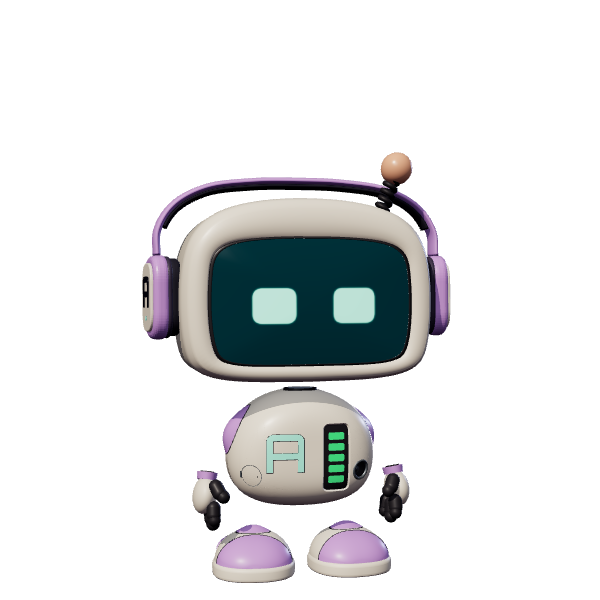
Five cells on his chest show how much charge is left, and the stream itself decides how fast it goes.
- A full battery lasts an hour by default, and you set how long.
- A donation plugs in a cable and charges him by its share of a full charge, which you set in your base currency.
- A channel point reward you pick brings him a battery, worth up to 40 percent.
- At zero he falls asleep and stops dancing, and a donation or the reward you picked wakes him up.
- He mentions 80, 60, 40 and 20 percent left, and the whole battery can be switched off.
Make him yours
Bytey is built from parts, and the parts are picked separately.
- Four kits, Classic, Rivet, Drift and Rover, and head, body and feet can come from different ones.
- The feet decide how he moves: Classic and Rivet walk, Drift hovers, Rover rolls on tracks.
- Nine face styles, two palettes and ten colours of his parts.
- Hats, ears, headphones, a bow and hair clips, four antenna tips and eight chest badges.
- Enamel, matte or metal finish, with wear, scratches and rivets if you like.
- Camera angle and zoom, spotlights, particles and lasers. The light show stays off until you turn it on, so over your game only the robot is seen.
With the AI Stream Agent
Bytey never calls the AI himself and spends no credits. When you use the AI Stream Agent, he shows what it is doing.
- While you hold the voice key he listens, then thinks, then shows how the command ended.
- When a viewer asks the bot in chat, he shows who asked and when the bot answered.
- The words themselves stay off his screen: he shows the steps, not the conversation.
- The AI Stream Agent spends credits; the free plan gives 100 credits a month.
What he is not
Bytey reacts to your stream; he does not run it.
- He makes no sound and does not speak aloud: his lines are text on his screen.
- He does not write in chat and does not react to ordinary chat messages.
- You pick from his kits and parts; there is no field for a model of your own.
- On Kick he reacts to channel point rewards. Follows, raids and bits come from Twitch.
- Without the strAImer plugin for OBS he does not hear game sound, your microphone or music players.
- He needs WebGL 2 in the browser source, and his battery starts full again whenever OBS reloads the source.
Bytey's song
A music video about Bytey: his looks, his moves and the battery your viewers charge. The dance in it is set to the song by hand; on stream he picks up the beat of your alerts and music by himself.
What it is made of
Each part is a separate module: you install only the ones you need, and any of them can be removed without breaking the rest.
Getting started
- Install Mascot Widget from Module Catalog → Add-ons.
- Open Widgets → Mascot and press Create widget. On Bytey's card press Download, then press Create widget.
- Press Copy OBS link and add it to OBS as a Browser source, 1920 × 1080.
- In OBS turn on browser source hardware acceleration: Settings, Advanced, Sources, then restart OBS.
Without hardware acceleration OBS draws him on the processor instead of the graphics card, and the dance can stutter. An alert with no sound gives him nothing to dance to.
Works together with
Get strAImer
Everything on this page runs on your own computer and is free, except the AI part — it runs on our server and costs credits, and the app shows the price before each request.
Missing something here? Ask for it on the ideas board — votes show what people need most. Propose an idea