

Keyboard and mouse overlay for OBS: show viewers what you press
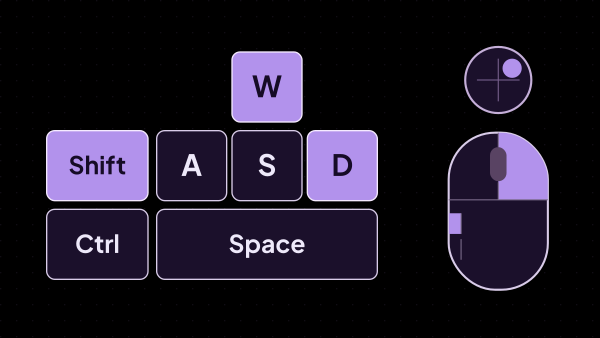
Viewers watch the keys and mouse buttons light up as you press them. Show only what matters — WASD and two abilities, not the whole board — or take a ready-made layout for a shooter, MOBA, osu!, Minecraft or a platformer. strAImer reads the input itself instead of waiting for the browser source to be in focus, so the overlay keeps working while the game is in front, and letters stay hidden outside games so what you type never reaches the stream.
Free — like everything that runs on your own PC.
What it can show, and that is the whole list
One widget is one overlay: its own layout, its own look, its own rules about letters. Make as many as you need and switch between them from the list.
- Any key on the keyboard, held by its place rather than its letter: a streamer on AZERTY keeps the WASD shape and sees Z Q S D on the caps.
- Five mouse buttons and the wheel, drawn as a mouse: left, right, wheel click, back and forward.
- Mouse movement as a round pad with a dot that leans the way you move, with adjustable sensitivity.
- Your own caption on a key: Jump instead of Space, Ult instead of R.
- Ready-made layouts for a shooter, MOBA, osu!, a platformer, Minecraft, mouse only or the full keyboard, and your own saved ones next to them.
It keeps working while you play
Browser-based key overlays read the keyboard in the page, which means they see nothing while the game holds focus. strAImer reads the input in the app and sends it to the source.
- The game is in front and the overlay still lights up: nothing has to stay focused for it to work.
- A game run as administrator hides input from ordinary programs; strAImer offers a helper for it once and Windows asks for permission a single time.
- Playing through a capture card puts the picture seconds behind your hands. A delay lines the keys back up with the video: up to two seconds on the slider, up to ten typed into the box beside it, for a second PC that lags further behind.
- Each overlay has an on-air switch in the list: switch it off and it goes dark in OBS, without deleting the layout you built.
What you type does not go on stream
An overlay that shows every key is a screen-wide keylogger unless it knows when to keep quiet. This one keeps quiet by default.
- Letters, digits, punctuation and mouse movement are shown only while a game is in front; everywhere else the overlay goes silent.
- Full-screen games are recognised on their own. A game in a window is added once from a list of what is running.
- Modifiers and gameplay keys stay visible anyway, so the overlay does not look broken while you are on the desktop.
- The mode that shows everything in any window exists and is one confirmation away, stated plainly: in it, a password typed on stream is visible.
What it is not
Things people expect from an overlay like this and will not find here.
- Not an OBS plugin: it is a browser source, so it works in OBS Studio, Streamlabs and anything else that opens a page.
- Not a gamepad overlay yet. Keyboard and mouse today.
- Not a recorder: nothing about your keys is stored, uploaded or sent anywhere. What the app reads goes to your overlay and nowhere else.
- Not a keyboard picture with a fixed size: the layout is measured from your source, so it stays sharp on a 4K scene instead of being stretched.
How it looks on screen
The same editor as the other strAImer overlays: a live preview in the middle, settings on the right, and the frame showing exactly what OBS will get.
- Keys, captions, the pressed key and the press animation are styled separately, with Neon, Minimal and Retro to start from.
- A checkbox shows every key pressed at once, so the pressed look can be tuned without pressing anything.
- The layout fills the source down to the edge; any gap around it is the padding you set and can see.
- Keys are dragged and resized right in the preview, and a layout you like is saved to your own library for the next widget.
What it is made of
Each part is a separate module: you install only the ones you need, and any of them can be removed without breaking the rest.
Getting started
- Open Widgets → Input and create a widget: it arrives with a shooter layout, already working.
- Pick a ready-made layout or add the keys you need from the on-screen keyboard, then drag them into place.
- Copy the link from the list and add a browser source in OBS, sized to the shape of your layout.
- Style it next to the live preview and, if you play through a capture card, set the delay so the keys match the video.
The layout fills the source, so give the browser source the shape of your layout: a wide source leaves empty space above and below.
Works together with
Get strAImer
Everything on this page runs on your own computer — free, no account, nothing to connect.
Missing something here? Ask for it on the ideas board — votes show what people need most. Propose an idea